
An STL file is the plain, simple file that nearly every 3D printer and CNC program understands. It describes a shape using nothing but triangles, and that simplicity is exactly why it became the standard, and why it is the file Embossify makes first. It is the old reliable of 3D files: not fancy, but everything understands it.
Why STL is the format everyone uses
There are newer, cleverer formats. STL is still the one you will find on almost every model site, in every slicer and in nearly every CNC program. That is not an accident.
Why Embossify makes STL first
A picture becomes a relief by turning brightness into height. That is a grid of heights, and a grid of heights becomes a surface of triangles in the most natural way there is: every square of the grid is cut into two triangles. The result is a clean, watertight shell, which is exactly what STL stores.
- It fits the job. A relief has no colors to keep and no curves that need exact math. Triangles describe it perfectly well.
- It works wherever you are going. The same file prints on a filament or resin printer and carves on a CNC router. You should never have to ask whether your machine can read it.
- Every other format starts from it. The 3MF, GLB, PLY, OBJ and heightmap files we offer are made from the same triangles, so the shape is identical. Read the 3D file formats guide to see when another one is a better fit.
- It is always included. The free Standard resolution file and every paid order include an STL, because it is the one format you can count on.
A skin made of triangles
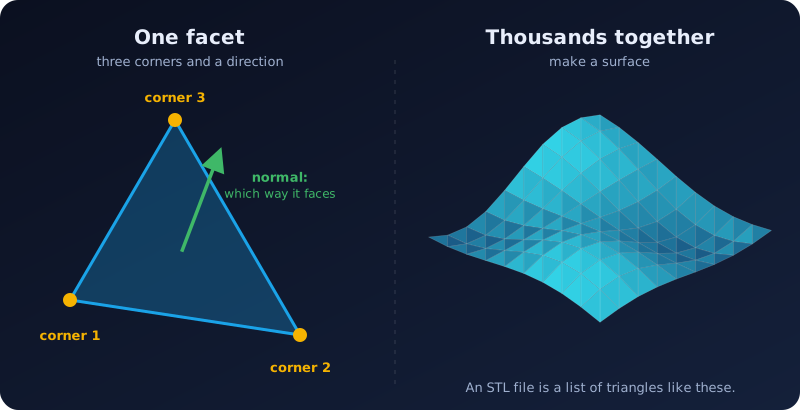
Picture a model as a hollow shell. An STL file stores that shell as a long list of flat triangles, called facets. For each triangle it saves:
- Three corners (vertices), each with an X, Y and Z position.
- A normal: an arrow that says which side of the triangle is the outside.
That is all. There is no color, no texture, no material, and no real curves: a smooth ball is just a lot of very small flat triangles.
Where the name comes from
STL is most often explained as short for stereolithography, the first 3D printing method, which uses light to harden liquid resin. You will also see it called "Standard Triangle Language" or "Standard Tessellation Language", but those are friendly nicknames made up afterward.
No units, so check the size
An STL file stores numbers, not millimeters or inches. The program that opens it has to decide what one unit means. Most slicers assume millimeters, and so does Embossify: a model made 120 wide will open as 120 mm. If a model ever opens tiny or enormous, units are the first thing to check.
Binary and ASCII STL
There are two flavors. They hold the same shape.
| Flavor | What it is | Size |
|---|---|---|
| Binary | Compact numbers. Exactly 50 bytes for each triangle, plus an 84 byte header. | A million triangles is about 50 MB |
| ASCII | Plain text you can open in a text editor. | Several times bigger |
Use binary. It is smaller and faster to open. Embossify always makes binary STL files.
How a 3D printer uses it
You do not send the STL to the printer. You open it in a slicer (Cura, PrusaSlicer, Bambu Studio and others), which cuts the shape into thin layers and writes the instructions for your printer. Filament printers get G-code. Resin printers get a stack of layer images in their own file format.
How a CNC router uses it
CNC software such as Vectric Aspire, Autodesk Fusion or Carbide Create Pro reads the STL as a surface and works out toolpaths: the route a spinning bit follows to carve that surface. Our CNC routing guide walks through it.
What STL cannot do
- It cannot store color or textures. Formats such as 3MF and OBJ can (see 3D file formats compared).
- It has no true curves, so smooth shapes need many triangles and big files.
- It has no built-in check. A shell with a hole in it is still a valid STL, but a slicer may not know what is inside and what is outside.
Formats like STEP keep exact curves and are better for engineering design, but STL remains the common language between design software and machines. For a relief, a terrain model or a lithophane, it is all you need.
What makes an STL "healthy"
A good model is watertight: every edge is shared by exactly two triangles, so there are no gaps. All normals point outward, and nothing is paper-thin. You can check a file for free in the Embossify Lens: it runs a mesh check and shows the size, triangle count and volume without uploading anything.