
A CNC router is a computer-guided carving machine. It spins a cutting bit and moves it through wood, plastic or soft metal, following a path that comes from your design. Picture a very patient woodworker who never needs coffee and never sneezes mid-cut.
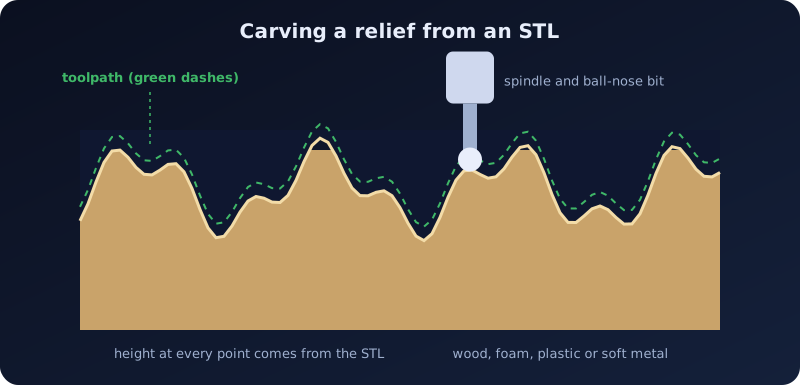
How it works
CNC stands for Computer Numerical Control. The machine moves a spindle along three axes: X and Y across the material, and Z up and down. The pieces:
- Your design, such as an STL file for a 3D relief, or a 2D drawing for flat cuts.
- CAM software that turns the design into toolpaths: the exact routes the bit will take.
- G-code, the list of moves the CAM program saves for the machine.
- A bit (also called an end mill) chosen for the job.
This is subtractive manufacturing: the machine removes material, so nothing is added.
Carving a picture
A relief carving turns a picture into varied depth: higher areas are left standing, lower areas are cut away. That is exactly what Embossify makes.
- Pick a clear picture. Contrast matters, because brightness becomes height. Crop out anything you do not want carved.
- Choose a preset. Relief / CNC is a deep relief with no base. Wood carving is 6 mm deep, with a wide flat border and a little smoothing. Set the width to your board's size.
- Watch the direction. In Embossify, light areas are high and dark areas are low. If your result is the wrong way around, turn on Invert depth.
- Download the STL and open it in your CAM program. Standard is fine for a quick test; use High or Ultra for a large or very detailed carve.
- Set the depth for your material and let the software generate the toolpaths.
CAM programs that read STL
Vectric Aspire, Autodesk Fusion and Carbide Create Pro can all import an STL and carve it as a 3D relief. Other CAM programs can too. Check yours for an option such as "import 3D model" or "3D finishing toolpath".
Roughing and finishing
Good carves usually use two kinds of passes:
- Roughing: a larger flat bit removes most of the waste quickly and leaves a thin skin of material.
- Finishing: a ball-nose bit follows the surface closely for a smooth result. A smaller bit and a tighter stepover (the gap between neighboring passes) give finer detail, and a longer job.
What you can carve
- Wood and MDF: signs, plaques, panels and furniture details.
- Plastics such as acrylic and HDPE.
- Foam and machinable wax, often used to make molds.
- Aluminum and other soft metals, but only on a rigid machine that is built for it.
Before you press start
- Simulate first. Run the preview in your CAM software. It is cheaper than a broken bit.
- Clamp the material down firmly and use the correct speeds and feeds for your bit and material.
- Protect yourself. Wear eye and ear protection and a dust mask, and keep dust collection running.
- Stay close. Never leave a running machine alone.