
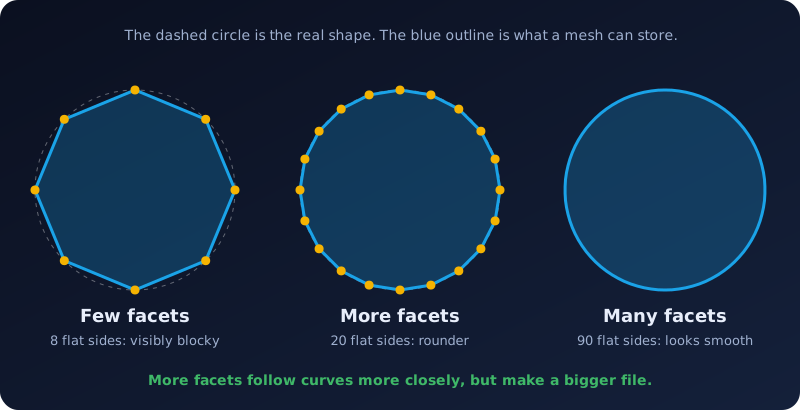
Facets are the flat triangles every STL file is built from. How many there are decides how smooth your model looks, and how big the file gets. Too few and your sphere looks like a disco ball; too many and the file is the size of a small novel.
What a facet is
A facet is one flat triangle: three corners and a direction it faces. An STL surface is thousands, or millions, of them side by side. Why triangles? Three points always lie on one flat plane, so a triangle can never twist. Any other shape can. That makes triangles the simplest building block for any surface. See what an STL file is for the full picture.
How a picture becomes facets
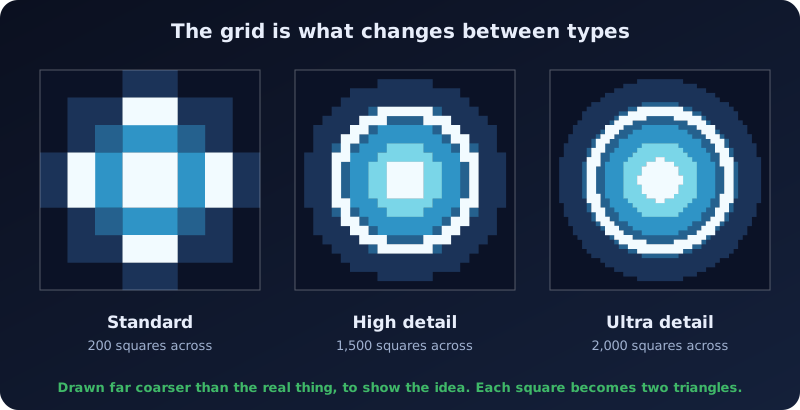
Embossify turns brightness into height. It lays an even grid of squares over your picture, gives each square a height from the brightness of its pixels, and splits every square into two triangles. A flat back and sides close the shape into a solid.
The numbers
Because every square becomes two triangles, and a binary STL spends 50 bytes on each triangle, you can estimate a file size yourself: about 100 bytes per square.
| Type | Squares across | Example: a 3:2 photo |
|---|---|---|
| Standard (free) | 200 | about 27,000 squares, 53,000 triangles, roughly 3 MB |
| High detail | 1,500 | about 1.5 million squares, 3 million triangles, roughly 150 MB |
| Ultra detail | 2,000 | about 2.7 million squares, 5.3 million triangles, roughly 270 MB |
Embossify uses an even grid, so file size depends on the type you pick, not on how busy your picture is. The Gallery shows the same close-up at every type, so you can judge the difference with your own eyes.
How many is enough?
A finer grid only helps when it is finer than the thing that will use it. A 120 mm wide model at High detail has squares about 0.08 mm across. Most filament printers lay down lines 0.4 mm wide, so they cannot show that, though a CNC with a fine bit or a resin printer might. A blurry or small picture gains nothing from Ultra: you only get a bigger file.
- Print or carve small and simple? Standard is often plenty.
- Large, detailed, or going to a CNC? Choose High or Ultra.
- Slicer slow or running out of memory? Use a lower type.
Tips
- Start with a sharp, high-contrast picture. Facets can only record detail your picture has.
- Use Smoothing for speckles. Grain and JPG noise turn into tiny bumps. The Smoothing slider softens them.
- Look at the triangles. The Embossify Lens has a wireframe style that shows the mesh, and the converter preview has a Mesh button.
Quick answers
Are facets the same as polygons?
Facets are polygons, but in an STL they are always triangles.
Why does my smooth ball look faceted?
Because it is made of flat triangles. A finer mesh hides it, but you may also see the printer's own layer lines, which are a separate effect.